IOC控制反转,一种思想(Invocation Of Control)—–>解耦
一、IOC控制反转,一种思想(Invocation Of Control)—–>解耦
- 工厂模式(常用的实例化对象模式)工厂中的方法替代new创建对象的一种方式
DI(Dependency Injection)IOC的具体实现
- 坐等框架把持久层对象传入业务层
Spring注解驱动开发入门
小案例
主配置类(@Configuration也可以使用@Component来代替)
package config;

import org.springframework.context.annotation.Configuration;
import org.springframework.context.annotation.Import;
import org.springframework.context.annotation.PropertySource;

//spring的配置类,相当于 applicationContext.xml的作用
@Configuration
//导入类路径下的jdbc.properties文件
@PropertySource("classpath:jdbc.properties")
//将jdbc的配置文件导入到主配置类中
@Import(JdbcConfig.class)
public class SpringConfiguration {

}
JDBC配置类
package config;

import org.springframework.beans.factory.annotation.Autowired;
import org.springframework.beans.factory.annotation.Value;
import org.springframework.context.annotation.Bean;
import org.springframework.jdbc.core.JdbcTemplate;
import org.springframework.jdbc.datasource.DriverManagerDataSource;

import javax.sql.DataSource;
import java.sql.DriverManager;

//jdbc操作相关的配置类
public class JdbcConfig {
    //定义变量
    @Value("${jdbc.driver}")
    private String driver;
    @Value("${jdbc.url}")
    private String url;
    @Value("${jdbc.username}")
    private String username;
    @Value("${jdbc.password}")
    private String password;

    //创建JdbcTemplate对象,存入IOC容器
    @Bean("jdbcTemplate")
    public JdbcTemplate createJdbcTemplate(@Autowired DataSource dataSource) {
        return new JdbcTemplate(dataSource);
    }
    //放入容器,创建数据源
    @Bean
    public DataSource createDataSource() {
    //1.创建spring内置数据源对象
        DriverManagerDataSource dataSource=new DriverManagerDataSource();
        //2.给数据源提供必要参数
        dataSource.setDriverClassName(driver);
        dataSource.setUrl(url);
        dataSource.setUsername(username);
        dataSource.setPassword(password);
        return dataSource;

    }
}
测试类
package com.itheima.test;
import org.springframework.context.annotation.AnnotationConfigApplicationContext;
import org.springframework.jdbc.core.JdbcTemplate;

//测试spring注解开发入门
public class SpringAnnotationTest {
    public static void main(String[] args) {
        //1.创建容器
        AnnotationConfigApplicationContext applicationContext=new AnnotationConfigApplicationContext("config");
        //2.根据BeanId获得对象
        JdbcTemplate jdbcTemplate = applicationContext.getBean("jdbcTemplate", JdbcTemplate.class);
        //3.执行操作
         jdbcTemplate.update("insert into account values(?,?,?)",null,"hanrui",1000);

    }
}
pom.xml
    <dependencies>
<!--        导入spring-ioc坐标-->
        <dependency>
            <groupId>org.springframework</groupId>
            <artifactId>spring-context</artifactId>
            <version>5.1.6.RELEASE</version>
        </dependency>
<!--        数据库驱动-->
        <dependency>
            <groupId>mysql</groupId>
            <artifactId>mysql-connector-java</artifactId>
            <version>8.0.12</version>
        </dependency>
<!--        导入spring-jdbc-->
        <dependency>
            <groupId>org.springframework</groupId>
            <artifactId>spring-jdbc</artifactId>
            <version>5.1.6.RELEASE</version>
        </dependency>
    </dependencies>
二、IOC常用注解分析
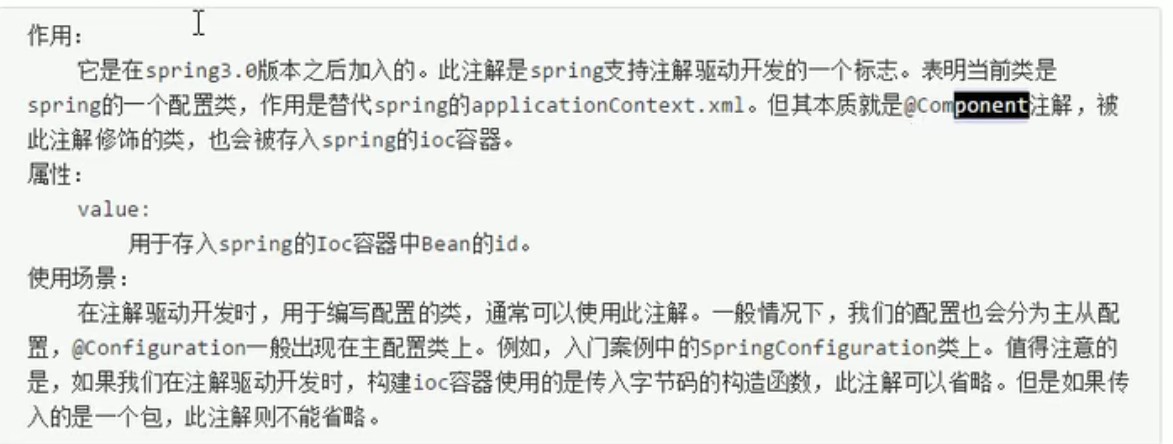
@Configuration
本质:Component
Tips:获得bean对象的方式
- 直接根据SpringConfiguration.class来获取
SpringConfiguration bean = applicationContext.getBean(SpringConfiguration.class);根据id和.class来获取
applicationContext.getBean(“jdbcTemplate”, JdbcTemplate.class);
package com.itheima.test;

import config.SpringConfiguration;
import org.springframework.context.annotation.AnnotationConfigApplicationContext;

public class ConfigurationTest {
    public static void main(String[] args) {
        //传入要扫描包的方式@Configuration
//        //创建容器
//    AnnotationConfigApplicationContext applicationContext=new AnnotationConfigApplicationContext("config");
//        //获得对象
//    SpringConfiguration bean = applicationContext.getBean(SpringConfiguration.class);
//       //输出结果
//        System.out.println(bean);


        //传入被注解类的字节码的方式@Configuration可以省略
        //创建容器
        AnnotationConfigApplicationContext applicationContext=new AnnotationConfigApplicationContext(SpringConfiguration.class);
        //获得对象
        SpringConfiguration bean = applicationContext.getBean(SpringConfiguration.class);
        //输出结果
        System.out.println(bean);
    }
}
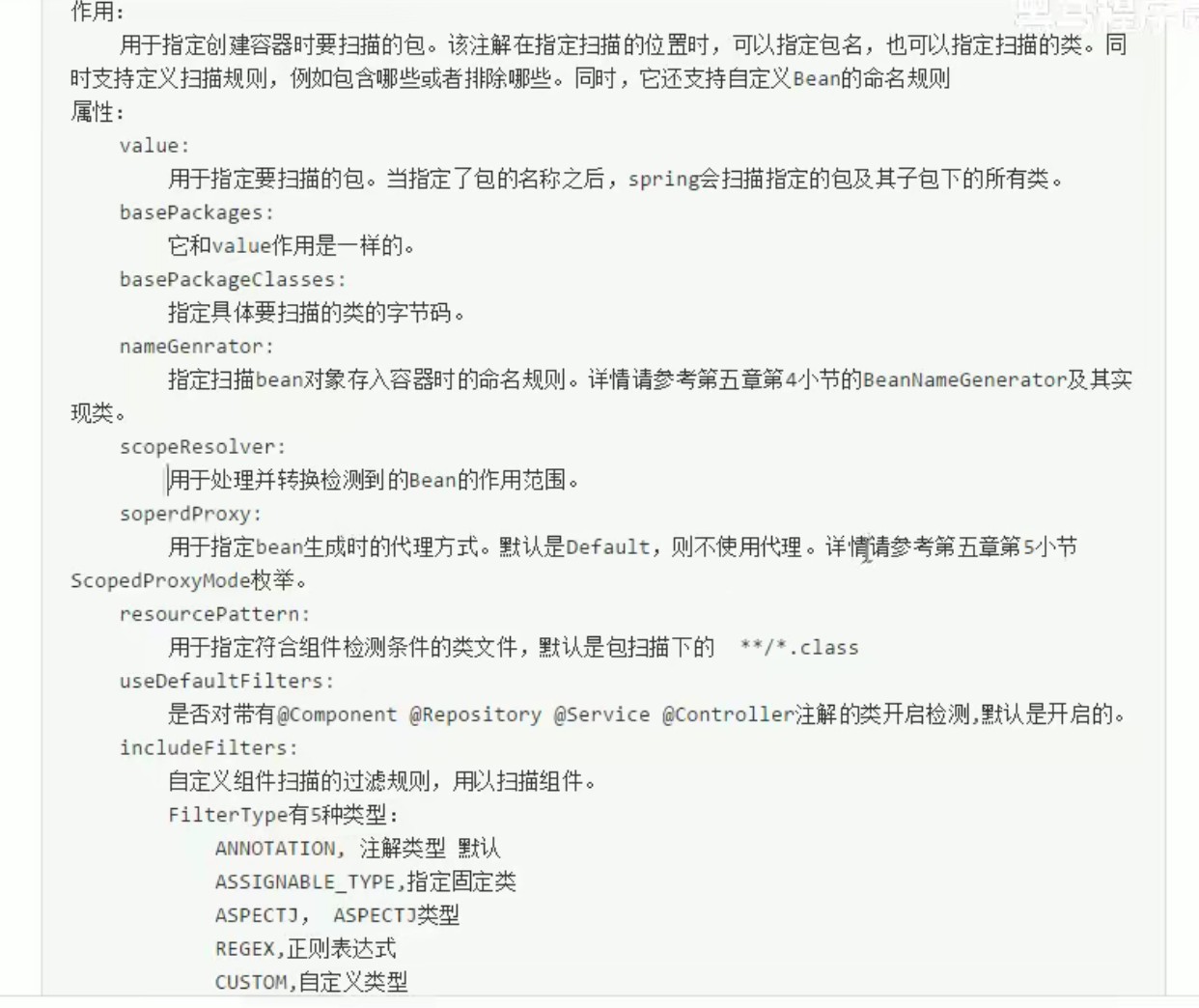
@ComponentScan包扫描
@ComponentScan(basePackages = "com.itheima")
@ComponentScan(basePackageClasses = UserService.class)
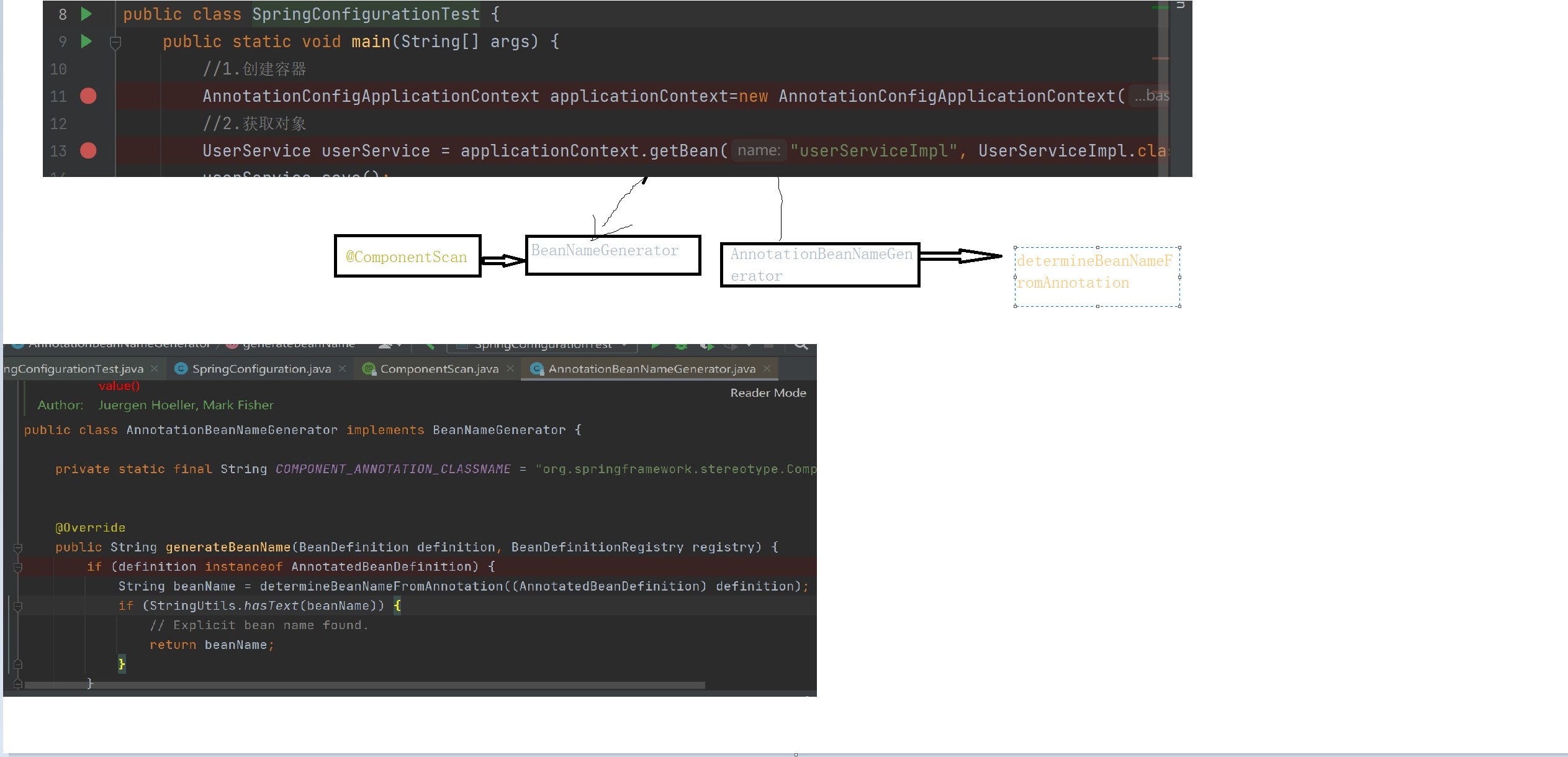
自定义命名的生成规则(我是废物,源码好难啊啊啊啊啊)
Bean的命名规则:没有自定义的名字就创建小写字母开头的类名作为bean名称
package com.itheima.customer;

import org.springframework.beans.factory.annotation.AnnotatedBeanDefinition;
import org.springframework.beans.factory.config.BeanDefinition;
import org.springframework.beans.factory.support.BeanDefinitionRegistry;
import org.springframework.beans.factory.support.BeanNameGenerator;
import org.springframework.context.annotation.AnnotationConfigUtils;
import org.springframework.core.annotation.AnnotationAttributes;
import org.springframework.core.type.AnnotationMetadata;
import org.springframework.core.type.StandardAnnotationMetadata;
import org.springframework.lang.Nullable;
import org.springframework.util.Assert;
import org.springframework.util.ClassUtils;
import org.springframework.util.StringUtils;

import java.beans.Introspector;
import java.util.Map;
import java.util.Set;

public class CustomerBeanNameGenerator implements BeanNameGenerator {
    String beanName=null;
    private static final String COMPONENT_ANNOTATION_CLASSNAME = "org.springframework.stereotype.Component";
    private boolean isStereotypeWithNameValue(String annotationType,
                                                Set<String> metaAnnotationTypes, @Nullable Map<String, Object> attributes) {

        boolean isStereotype = annotationType.equals(COMPONENT_ANNOTATION_CLASSNAME) ||
                metaAnnotationTypes.contains(COMPONENT_ANNOTATION_CLASSNAME) ||
                annotationType.equals("javax.annotation.ManagedBean") ||
                annotationType.equals("javax.inject.Named");

        return (isStereotype && attributes != null && attributes.containsKey("value"));
    }
    protected String buildDefaultBeanName(BeanDefinition definition) {
        String beanClassName = definition.getBeanClassName();
        Assert.state(beanClassName != null, "No bean class name set");
        String shortClassName = ClassUtils.getShortName(beanClassName);
        return Introspector.decapitalize(shortClassName);
    }
    public String generateBeanName(BeanDefinition beanDefinition, BeanDefinitionRegistry beanDefinitionRegistry) {
        //1.判断当前bean的定义信息是否是注解的
        if (beanDefinition instanceof AnnotatedBeanDefinition){
            //2.把definition转成注解的bean定义信息
            AnnotatedBeanDefinition annotatedBeanDefinition=(AnnotatedBeanDefinition)beanDefinition;
            //3.获取注解Bean定义的原信息
            AnnotationMetadata metadata=annotatedBeanDefinition.getMetadata();
            //4.获取定义信息
            Set<String> types = metadata.getAnnotationTypes();
            for (String type :types
                 ) {
                //5.得到注解的属性
                AnnotationAttributes attributes= AnnotationAttributes.fromMap(metadata.getAnnotationAttributes(type,false));
                //6.判断attributes是否为null,同时必须是@Component及其衍生注解(JSR250)
                if (attributes != null && isStereotypeWithNameValue(type, metadata.getMetaAnnotationTypes(type), attributes)) {
                    //7.获取value属性的值
                    Object value = attributes.get("value");
                    //8.判断value是否是String类型的
                    if (value instanceof String) {
                        String strVal = (String) value;
                        //9.判断value是否有值
                        if (StringUtils.hasLength(strVal)) {
                            if (beanName != null && !strVal.equals(beanName)) {
                                throw new IllegalStateException("Stereotype annotations suggest inconsistent " +
                                        "component names: '" + beanName + "' versus '" + strVal + "'");
                            }
                            beanName = strVal;
                        }
                    }
                }

            }
        }
    return beanName!=null? "my"+beanName:"my"+buildDefaultBeanName(beanDefinition);
    }
}
@Bean注解
可以写在方法和注解上,将方法的返回值添加到spring的容器中
不指定value或name的时候,默认值为方法名,方法重载的时候,以后面的为主。
autowireCandidate默认值为true、可以用@Autowaired来注入,是false的时候要通过@Resource(name = “dataSource”)来注入
@Import
默认扫包规则:.@Configuration(basepackage=”xxx”)的时候 扫描basepackage
@Configuration或者没有@Configuration 扫描@Import所在的类的包
作用在类上,一般和注解的驱动的配置类一起使用。
1.在主配置类导入
@Configuration
@Import(JdbcConfig.class)
public class SpringConfiguration {

}
2.加上@Configuration标签或者@Component标签 spring都会将其加载到容器中。
自定义导入器 使用类的全限定名作为唯一标识 com.itheima.dao.LoginUtil
实现的功能 :1. 没有@Configuration或者没有指定其basepackage的时候,会扫描配置文件中的customer.importSelector.package的包和@Import所在的包
2.@Configuration(basepackage=”xxx”)的时候会扫描basepackage的包和指定的 customer.importSelector.package
#扫描的规则
customer.importSelector.expression=com.itheima..*
#使用者指定的包名
customer.importSelector.package=com.itheima.dao
package importSelector;

import org.springframework.context.annotation.ClassPathScanningCandidateComponentProvider;
import org.springframework.context.annotation.ComponentScan;
import org.springframework.context.annotation.ImportSelector;
import org.springframework.core.io.support.PropertiesLoaderUtils;
import org.springframework.core.type.AnnotationMetadata;
import org.springframework.core.type.filter.AspectJTypeFilter;
import org.springframework.core.type.filter.TypeFilter;
import org.springframework.util.StringUtils;
import java.util.*;

//自定义导入期
public class CustomerImportSelector implements ImportSelector {
    //表达式(ASPECTJ表达式)
    private String expression;
    //使用者指定的包名
    private String customerPackage;


    //默认构造函数,用来读取配置文件给表达式赋值2
    public CustomerImportSelector() {
        try {
            //1.Huo取Properties对象
            Properties properties = PropertiesLoaderUtils.loadAllProperties("customerimporter.properties");
            expression = properties.getProperty("customer.importSelector.expression");
            customerPackage=properties.getProperty("customer.importSelector.package");
        } catch (Exception e) {
            e.printStackTrace();
        }

    }

    //实现获取要导入类的字节码
    @Override
    public String[] selectImports(AnnotationMetadata importingClassMetadata) {
        //1.定义扫描的包
        List<String> basePackages = null;
        //2.判断有@Import注解的类上有没有@ComponentScan注解
        if (importingClassMetadata.hasAnnotation(ComponentScan.class.getName())) {
            //3.取出@CompotentScan的注解的属性(basePackages/value)
            Map<String, Object> attributes =
                    importingClassMetadata.getAnnotationAttributes(ComponentScan.class.getName());
            //4.取出basePackages属性的值
            basePackages =new ArrayList<String> (Arrays.asList((String [])attributes.get("basePackages")));
        }
        //5.判断是否有此注解,是否指定了包扫描信息
        if (basePackages == null || basePackages.size() == 0) {
            String basePackage = null;
            try {
                //6.取出@Import注释的类所在包的名称
                basePackage = Class.forName(importingClassMetadata.getClassName()).getPackage().getName();
            } catch (ClassNotFoundException e) {
                e.printStackTrace();
            }
            //7.把包名填充到basePackages
            basePackages = new ArrayList<String>();
            basePackages.add(basePackage);
        }
        //判断用户是否配置了客户自定义的包名
        if(!StringUtils.isEmpty(customerPackage)){
            basePackages.add(customerPackage);
        }

        //8.创建类路径扫描器
        //参数含义表面不使用过滤规则
        ClassPathScanningCandidateComponentProvider scanner = new ClassPathScanningCandidateComponentProvider(false);
        //9.创建类型过滤器(ASPECTJ)
        TypeFilter typeFilter = new AspectJTypeFilter(expression, CustomerImportSelector.class.getClassLoader());
        //10.把类型过滤器添加到扫描器中
        scanner.addIncludeFilter(typeFilter);
        //11.定义要扫描类的全限定名集合?
        Set<String> classes = new HashSet<>();
        //12.填充集合的内容
        for (String basePackage : basePackages) {
            scanner.findCandidateComponents(basePackage).forEach(beanDefinition -> classes.add(beanDefinition.getBeanClassName()));
        }
        //13.按照方法的返回值要求返回
        return classes.toArray(new String[classes.size()]);
    }
}
AOP里面当前包和子包 ..*
customer.importSelector.expression=com.itheima..*
@Test
public void test01(){
    //1.创建容器
    AnnotationConfigApplicationContext an=new AnnotationConfigApplicationContext("config");
    //2.获取对象
    LoginUtil bean = an.getBean("com.itheima.dao.LoginUtil", LoginUtil.class);
    bean.printLog();
}
自定义注册器 使用当前类的短类名作为唯一标识 loginUtil、userServiceImpl
package registrar;

import org.springframework.beans.factory.support.BeanDefinitionRegistry;
import org.springframework.context.annotation.ClassPathBeanDefinitionScanner;
import org.springframework.context.annotation.ComponentScan;
import org.springframework.context.annotation.ImportBeanDefinitionRegistrar;
import org.springframework.core.io.support.PropertiesLoaderUtils;
import org.springframework.core.type.AnnotationMetadata;
import org.springframework.core.type.filter.AspectJTypeFilter;
import org.springframework.core.type.filter.TypeFilter;
import org.springframework.util.StringUtils;

import java.lang.reflect.Array;
import java.util.*;

public class CustomerBeanDefinitionRegistrar implements ImportBeanDefinitionRegistrar {
    //定义表达式
    private String expression;
    //用户指定的扫描包
    private String customerPackage;

    public CustomerBeanDefinitionRegistrar() {
        //默认构造函数,用于给表达式赋值
        try {
            //1.读取properties文件
            Properties properties = PropertiesLoaderUtils.loadAllProperties("customerimport.properties");
            //2.给变量赋值
            expression = properties.getProperty("customer.importselector.expression");
            customerPackage = properties.getProperty("customer.importselector.package");
        } catch (Exception e) {
            e.printStackTrace();
        }
    }

    //实现了注册bean的功能(通过扫描指定包的功能实现)
    @Override
    public void registerBeanDefinitions(AnnotationMetadata importingClassMetadata, BeanDefinitionRegistry registry) {
        //1.定义扫描包的集合
        List<String> basePackages = null;
        //2.判断是否有@ComponentScan注解
        if (importingClassMetadata.hasAnnotation(ComponentScan.class.getName())) {
            //3.you@ComponentScan注解,去取出注解的属性
            Map<String, Object> attributes = importingClassMetadata.getAnnotationAttributes(ComponentScan.class.getName());
            //获取属性为basePackages(或者是value)
            basePackages = new ArrayList<>(Arrays.asList((String[]) attributes.get("basePackages")));
        }
        //5.判断是否有此注解,如果没有此注解时,basePackets为null,如果有此注解但是没有指定basePacket属性或者value属性值,list集合是size为0
        if (basePackages == null || basePackages.size() == 0) {
            String basePackage = null;//用于记录@Import所在类的包
            try {
                //6.取出Import的类所在的包
                basePackage = Class.forName(importingClassMetadata.getClassName()).getPackage().getName();
            } catch (Exception e) {
                e.printStackTrace();
            }
            //7.添加到扫描包的集合中
            basePackages = new ArrayList<>();
            basePackages.add(basePackage);
        }
        //判断用户是否配置了扫描的包
        if (!StringUtils.isEmpty(customerPackage)){
            basePackages.add(customerPackage);
        }


        //8.创建类路径扫描器
        ClassPathBeanDefinitionScanner scanner = new ClassPathBeanDefinitionScanner(registry, false);
        //9.继续创建类型过滤器
        TypeFilter typeFilter = new AspectJTypeFilter(expression, CustomerBeanDefinitionRegistrar.class.getClassLoader());
        //10.把类型过滤器添加到扫描器中
        scanner.addIncludeFilter(typeFilter);
        //11.扫描指定的包
        scanner.scan(basePackages.toArray(new String[basePackages.size()]));

    }
}
@Test
public void test02(){
    //1.创建容器
    AnnotationConfigApplicationContext an=new AnnotationConfigApplicationContext("config");
    //2.获取对象
    LoginUtil bean = an.getBean("loginUtil", LoginUtil.class);
    bean.printLog();
    UserService userService = an.getBean("userServiceImpl", UserService.class);
    userService.save();
}
@PropertiySource
源码
@Target(ElementType.TYPE)
@Retention(RetentionPolicy.RUNTIME)
@Documented
@Repeatable(PropertySources.class)
public @interface PropertySource {
/**
* Indicate the name of this property source. If omitted, a name will
* be generated based on the description of the underlying resource.
* @see org.springframework.core.env.PropertySource#getName()
* @see org.springframework.core.io.Resource#getDescription()
*/
//指定资源名称,没给的话有一个默认的生成规则
String name() default "";
/**
* Indicate the resource location(s) of the properties file to be loaded.
* <p>Both traditional and XML-based properties file formats are supported
* — for example, {@code "classpath:/com/myco/app.properties"}
* or {@code "file:/path/to/file.xml"}.
* <p>Resource location wildcards (e.g. **/*.properties) are not permitted;
* each location must evaluate to exactly one {@code .properties} resource.
* <p>${...} placeholders will be resolved against any/all property sources already
* registered with the {@code Environment}. See {@linkplain PropertySource above}
* for examples.
* <p>Each location will be added to the enclosing {@code Environment} as its own
* property source, and in the order declared.
*/
//指定资源的路径 classpath或者基于文件所在位置
String[] value();
@PropertySource("file:///E:/Html/itheima_mybatis_multi/src/main/resources/jdbc.properties")
@PropertySource("classpath:jdbc.properties")
/**
* Indicate if failure to find the a {@link #value() property resource} should be
* ignored.
* <p>{@code true} is appropriate if the properties file is completely optional.
* Default is {@code false}.
* @since 4.0
*/
//忽略资源没有找到 true的时候找不到也不会报错
boolean ignoreResourceNotFound() default false;
/**
* A specific character encoding for the given resources, e.g. "UTF-8".
* @since 4.3
*/
//指定字符集
String encoding() default "";
/**
* Specify a custom {@link PropertySourceFactory}, if any.
* <p>By default, a default factory for standard resource files will be used.
* @since 4.3
* @see org.springframework.core.io.support.DefaultPropertySourceFactory
* @see org.springframework.core.io.support.ResourcePropertySource
*/
//在4.3版本之后使用了PropertySourceFactory接口的唯一实现类
Class<? extends PropertySourceFactory> factory() default PropertySourceFactory.class;
}
作用:
用于读取资源文件的位置。支持properties、xml、通过YAML解析器,配合自定义的PropertySorceFactory实现解YAML文件的解析
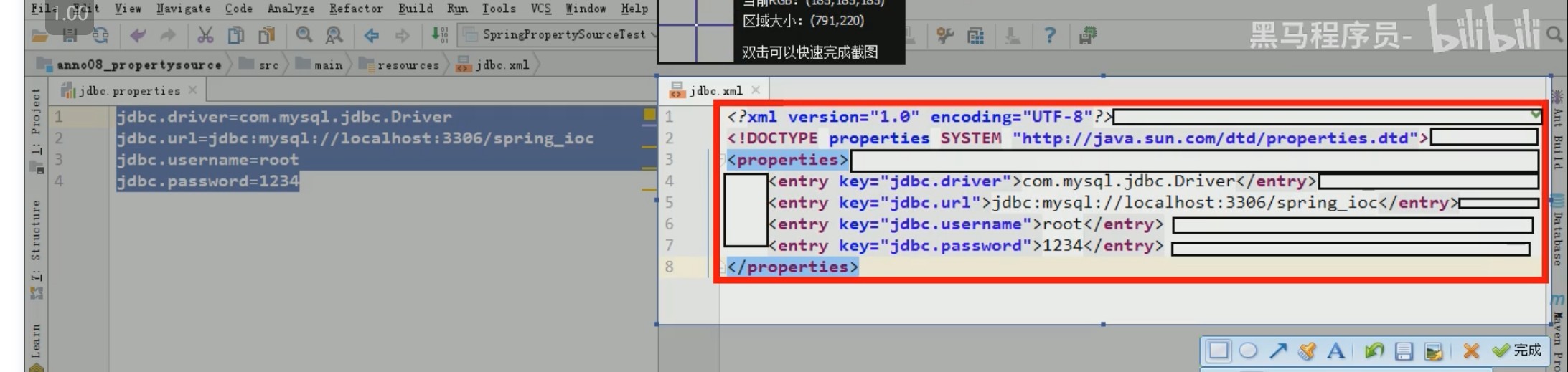
配置文件
properties简洁,
xml繁琐,有暗区,占空间(但是可以描述层级关系,格式标准)
ymal
#Yet Another Markup Language
#Yaml Yml
#写法:同一级的顶头写。  描述从属关系:另起一行,空两格书写  同一级从属,空格数相同
#键和值之间使用冒号和空格分割
jdbc:
  driver: com.mysql.cj.jdbc.Driver
  url: jdbc:mysql://localhost:3306/test?serverTimezone=GMT%2B8&useSSL=false&allowPublicKeyRetrieval=true
  username: root
  password: 111111
三、注解驱动开发之注入时机和设定注入条件的中注解
3.1设定注入条件的注解
@DependsOn
确定监听器的对象在事件源对象之前被创建
@Target({ElementType.TYPE, ElementType.METHOD})
@Retention(RetentionPolicy.RUNTIME)
@Documented
public @interface DependsOn {
   String[] value() default {};
}
@Lazy
@Target({ElementType.TYPE, ElementType.METHOD, ElementType.CONSTRUCTOR, ElementType.PARAMETER, ElementType.FIELD})
@Retention(RetentionPolicy.RUNTIME)
@Documented
public @interface Lazy {
boolean value() default true;
}
作用:
用于指定单例bean对象的创建时机。在没有使用此注解时,单例bean的生命周期与容器相同。但是当使用了此注解之后,单例对象的创建时机变成了第一次使用时创建。注意:这不是延迟加载思想(因为不是每次使用时都创建,只是第一次创建的时机改变了)。
属性:
value:
指定是否采用延迟加载。默认值为true,表示开启。
使用场景:
在实际开发中,当我们的Bean是单例对象时,并不是每个都需要一开始都加载到ioc容器之中,有些对象可以在真正使用的时候再加载,当有此需求时,即可使用此注解。值得注意的是,此注解只对单例bean对象起作用,当指定了@Scope注解的prototype取值后,此注解不起作用。
@Conditional
作用:
它的作用是根据条件选择注入的bean对象。
属性:
value:
用于提供一个Condition接口的实现类,实现类中需要编写具体代码实现注入的条件。
使用场景:
当我们在开发时,可能会使用多平台来测试,例如我们的测试数据库分别部署到了linux和windows两个操作系统上面,现在根据我们的工程运行环境选择连接的数据库。此时就可以使用此注解。同时基于此注解引出的@Profile注解,就是根据不同的环境,加载不同的配置信息,详情请参考第五章第9小节@Profile的使用。
3.2关于@autowired
自动按照类型注入,有唯一匹配没问题
没有唯一属性,required为true 抛出noSuchBean的异常
false 空指针异常
多个匹配,使用被注入的变量名称作为bean的id在容器里面匹配
匹配失败,也报expected 1 but 好几个的错误
3.3@qualifiered 不能脱离autowired来使用
按照bean的id匹配
3.4scope
3.5 @inject+@name 关系和@autowired与@qualifiered的关系一样 可以互相组合
3.6@Resource 既可以指定name也可以指定类型,或者二者都可以 type=”” name=””
3.7@Primary 类(自定义的类)方法上(返回值是bean的方法)
指定Besn注入的优先级
@PostConstruct 没属性 指定初始化方法
@PreDestory 没属性 指定销毁方法
四、Spring高级分析BeanFactory
4.1 容器对象的创建方式
和Junit整合
@RunWith(SpringJUnit4ClassRunner.class)
@ContextConfiguration(classes = SpringConfiguration.class)
@ActiveProfiles("dev")
public class SpringTest {
    @Autowired
    private DruidDataSource dataSource;
    @Test
    public void testDatasource(){
        System.out.println(dataSource.getMaxActive());
        System.out.println(dataSource.getPassword());
    }
}
手动创建
AnnotationConfigApplicationContext an=new AnnotationConfigApplicationContext("config");