SSM整合(配置地狱啊(;´д`)ゞ)
映射文件AccountMapper.xml的配置
parameterType应该是全类名,可以在sqlMapConfig中起别名
<!--    定义别名-->
    <typeAliases>
        <typeAlias type="com.example.domain.Account" alias="account"></typeAlias>
<!--        扫包  给包内的所以实体都起了类名和类名首字母小写的  别名-->
        <package name="com.example.domain"/>

    </typeAliases>
<?xml version="1.0" encoding="UTF-8" ?> <!DOCTYPE mapper PUBLIC "-//mybatis.org//DTD Mapper 3.0//EN" "http://mybatis.org/dtd/mybatis-3-mapper.dtd"> <mapper namespace="com.example.mapper.AccountMapper"> <insert id="save" parameterType="account"> insert into account values (#{id},#{name},#{money}) </insert> <select id="findAll" resultType="account"> select * from account </select> </mapper>配置sqlConfig.xml
<?xml version="1.0" encoding="UTF-8" ?>
<!DOCTYPE configuration PUBLIC "-//mybatis.org//DTD Config 3.0//EN" "http://mybatis.org/dtd/mybatis-3-config.dtd">
<configuration>
    <!--1.通过properties标签加载外部文件-->
    <properties resource="jdbc.properties"></properties>

    <!--    定义别名-->
    <typeAliases>
        <typeAlias type="com.example.domain.Account" alias="account"></typeAlias>
        <!--        扫包  给包内的所以实体都起了类名和类名首字母小写的  别名-->
        <package name="com.example.domain"/>

    </typeAliases>
    <!--   2. 环境-->
    <environments default="development">
        <environment id="development">
            <transactionManager type="JDBC"></transactionManager>
            <dataSource type="POOLED">
                <property name="driver" value="${jdbc.driver}"/>
                <property name="url" value="${jdbc.url}"/>
                <property name="username" value="${jdbc.username}"/>
                <property name="password" value="${jdbc.password}"/>
            </dataSource>
        </environment>
    </environments>
    <!--   3. 加载映射-->
    <mappers>
        <mapper resource="com/example/mapper/AccountMapper.xml"></mapper>
        <!-- 也可以扫包       <package name="com/example/mapper"/>-->
    </mappers>
</configuration>
Spring配置文件
<?xml version="1.0" encoding="UTF-8"?>
<beans xmlns="http://www.springframework.org/schema/beans"
       xmlns:xsi="http://www.w3.org/2001/XMLSchema-instance"
       xmlns:context="http://www.springframework.org/schema/context"
       xsi:schemaLocation="http://www.springframework.org/schema/beans http://www.springframework.org/schema/beans/spring-beans.xsd
http://www.springframework.org/schema/context http://www.springframework.org/schema/context/spring-context.xsd
">
<!--1.组件扫描  扫描service和mapper-->
    <context:component-scan base-package="com.example">
<!--    排除controller的扫描-->
  <context:exclude-filter type="annotation" expression="org.springframework.stereotype.Controller"/>
    </context:component-scan>
</beans>
Spring-mvc配置文件
<?xml version="1.0" encoding="UTF-8"?>
<beans xmlns="http://www.springframework.org/schema/beans"
       xmlns:xsi="http://www.w3.org/2001/XMLSchema-instance"
       xmlns:mvc="http://www.springframework.org/schema/mvc"
       xmlns:context="http://www.springframework.org/schema/context"
       xsi:schemaLocation="
       http://www.springframework.org/schema/beans http://www.springframework.org/schema/beans/spring-beans.xsd
       http://www.springframework.org/schema/mvc http://www.springframework.org/schema/mvc/spring-mvc.xsd
       http://www.springframework.org/schema/context http://www.springframework.org/schema/context/spring-context.xsd
">

    <!--1、mvc注解驱动-->
    <mvc:annotation-driven/>

    <!--2、内部资源配置视图解析器-->
    <bean class="org.springframework.web.servlet.view.InternalResourceViewResolver">
        <property name="prefix" value="/WEB-INF/pages"/>
        <property name="suffix" value=".jsp"/>
    </bean>

    <!--3、静态资源权限开放-->
    <mvc:default-servlet-handler/>

    <!--    4、组件扫描  扫描Controller-->
    <context:component-scan base-package="com.example.controller"/>


</beans>
web.xml
<?xml version="1.0" encoding="UTF-8"?>
<web-app xmlns="http://xmlns.jcp.org/xml/ns/javaee"
         xmlns:xsi="http://www.w3.org/2001/XMLSchema-instance"
         xsi:schemaLocation="http://xmlns.jcp.org/xml/ns/javaee http://xmlns.jcp.org/xml/ns/javaee/web-app_4_0.xsd"
         version="4.0">
    <!--    全局参数-->
    <context-param>
        <param-name>contextConfigLocation</param-name>
        <param-value>classpath:applicationContext.xml</param-value>
    </context-param>
    <!--    1.Spring监听器-->
    <listener>
        <listener-class>org.springframework.web.context.ContextLoaderListener</listener-class>
    </listener>
    <!--    2.springmvc的前端控制器-->
    <servlet>
        <servlet-name>DispatcherServlet</servlet-name>
        <servlet-class>org.springframework.web.servlet.DispatcherServlet</servlet-class>
        <init-param>
            <param-name>contextConfigLocation</param-name>
            <param-value>classpath:spring-mvc.xml</param-value>
        </init-param>
        <load-on-startup>3</load-on-startup>
    </servlet>
    <servlet-mapping>
        <servlet-name>DispatcherServlet</servlet-name>
        <url-pattern>/</url-pattern>
    </servlet-mapping>
    <!--    3.乱码的过滤器-->
    <filter>
        <filter-name>CharacterEncodingFilter</filter-name>
        <filter-class>org.springframework.web.filter.CharacterEncodingFilter</filter-class>
        <init-param>
            <param-name>encoding</param-name>
            <param-value>utf-8</param-value>
        </init-param>
    </filter>
    <filter-mapping>
        <filter-name>CharacterEncodingFilter</filter-name>
        <url-pattern>/*</url-pattern>
    </filter-mapping>

</web-app>
升级版,将sqlConfig.xml的东西配置到applicationContext.xml里面
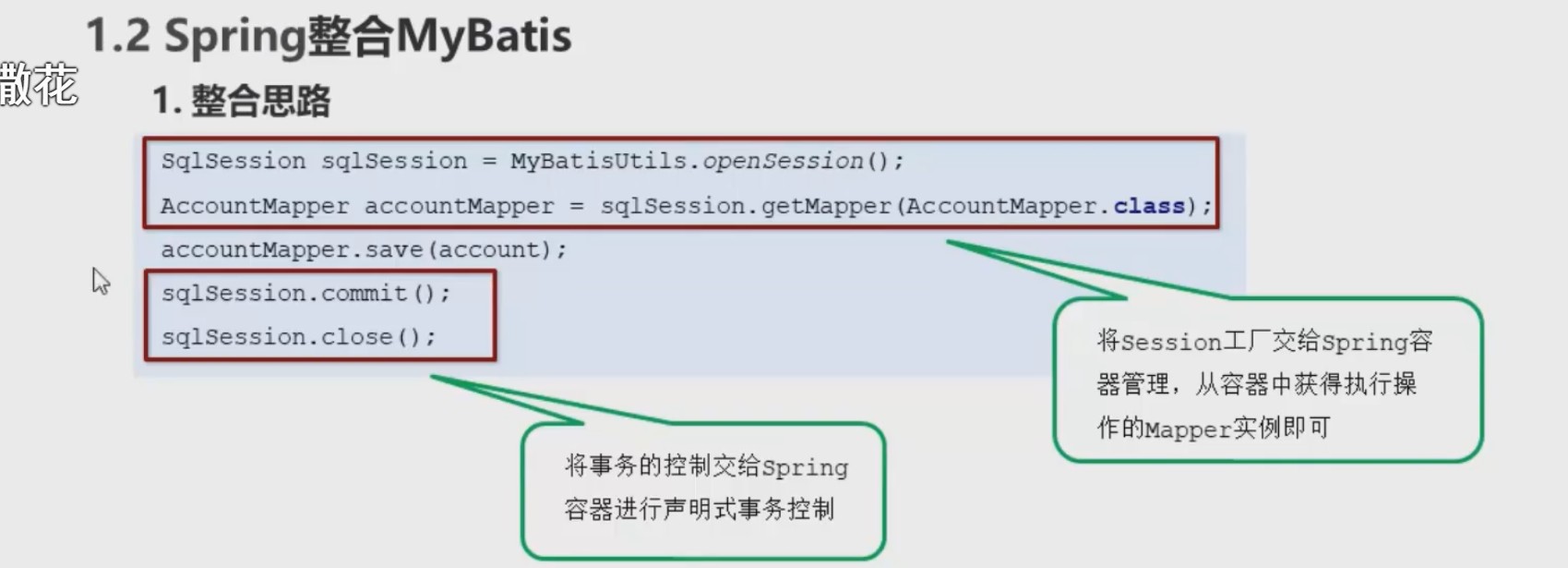
<?xml version="1.0" encoding="UTF-8"?>
<beans xmlns="http://www.springframework.org/schema/beans"
       xmlns:xsi="http://www.w3.org/2001/XMLSchema-instance"
       xmlns:context="http://www.springframework.org/schema/context"
       xsi:schemaLocation="http://www.springframework.org/schema/beans http://www.springframework.org/schema/beans/spring-beans.xsd
http://www.springframework.org/schema/context http://www.springframework.org/schema/context/spring-context.xsd
">
    <!--1.组件扫描  扫描service和mapper-->
    <context:component-scan base-package="com.example">
        <!--    排除controller的扫描-->
        <context:exclude-filter type="annotation" expression="org.springframework.stereotype.Controller"/>
    </context:component-scan>

    <!--通过properties标签加载外部文件-->
    <context:property-placeholder location="classpath:jdbc.properties"/>
    <!--数据源-->
    <bean class="com.mchange.v2.c3p0.ComboPooledDataSource" id="dataSource">
        <property name="driverClass" value="${jdbc.driver}"/>
        <property name="jdbcUrl" value="${jdbc.url}"/>
        <property name="user" value="${jdbc.username}"/>
        <property name="password" value="${jdbc.password}"/>
    </bean>
    <!--    配置sessionFactory-->
    <bean id="sqlSessionFactoryBean" class="org.mybatis.spring.SqlSessionFactoryBean">
        <property name="dataSource" ref="dataSource"/>
        <!--        加载Mybatis的核心文件-->
        <property name="configLocation" value="sqlMapConfig-spring.xml"/>
    </bean>
    <!--    扫描mapper所在包,为mapper创建实现类-->
    <bean class="org.mybatis.spring.mapper.MapperScannerConfigurer">
        <property name="basePackage" value="com.example.mapper"/>
    </bean>
</beans>